
DRM-X 6.0 · Media Packager for Windows
From master video to protected stream
Haihaisoft has released the DRM-X 6.0 Multi-DRM Media Packager for Windows. Encode, encrypt, verify and publish video in one workflow, with step-by-step video tutorials in English and Simplified Chinese.
- Four DRM systems
- Widevine, PlayReady, FairPlay and WisePlay
- Six storage options
- Managed 1AICLOUD plus five cloud providers
- 6 months of 1AICLOUD
- Free hosting with account approval
Publish your first title without stitching tools together
A single title can mean multiple quality levels, several language tracks and different playback requirements for browsers, phones and TVs. Haihaisoft designed the Media Packager around that work after listening to customers and studying how other Multi-DRM providers handle it.
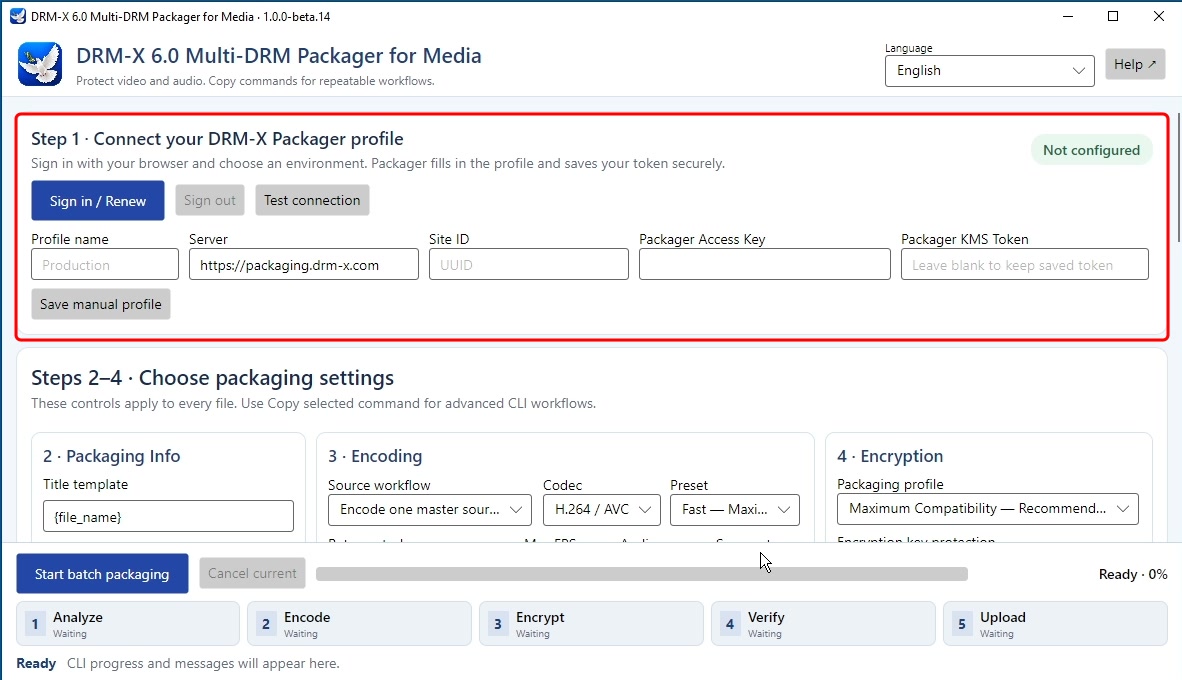
Click Sign in / Renew to connect your DRM-X account in your browser. After you approve access, the Packager sets up the profile and configures the packaging credentials, including the Packager KMS Token. Add your media, select a destination and use Package History to test the protected result.
Encode for different connections
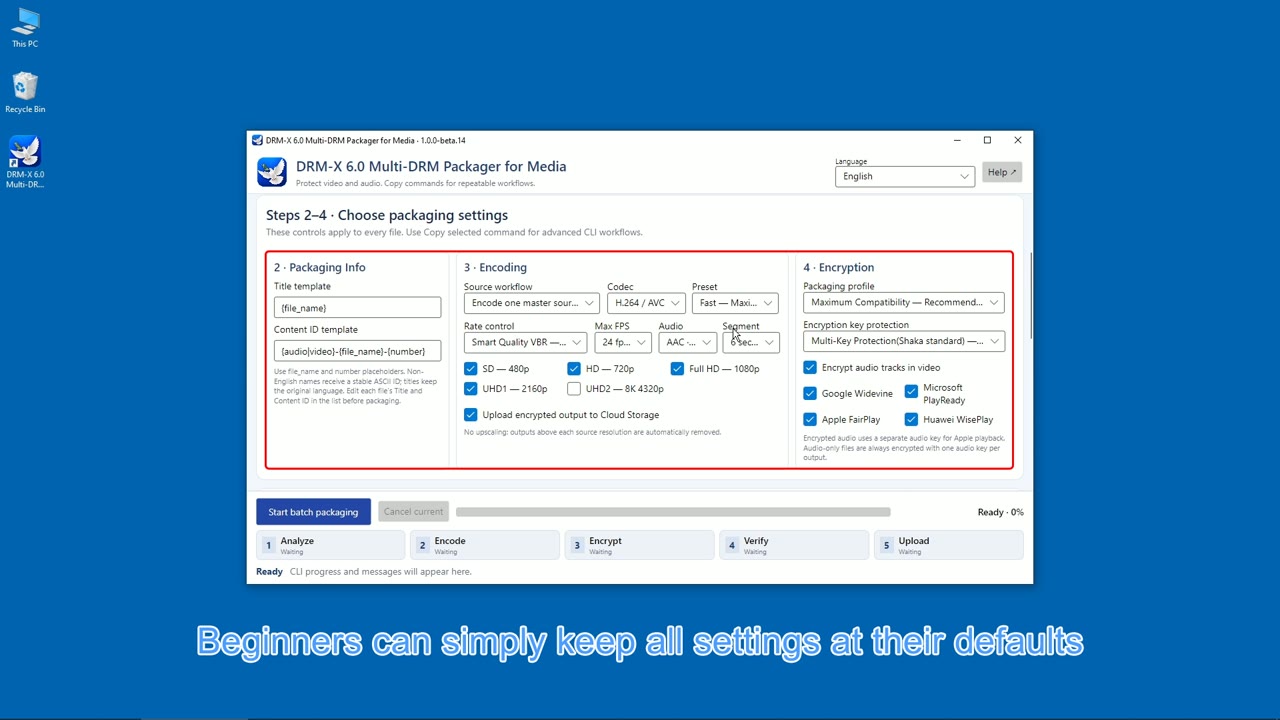
Smart Quality VBR adjusts bitrate to the video. Select the quality levels your viewers need so compatible players can adapt as network conditions change.
Keep audio and subtitles together
Add audio languages, commentary and subtitle tracks to the same title. Viewers can choose from the tracks you make available.
Prepare four DRM paths
Package for Google Widevine, Microsoft PlayReady, Apple FairPlay Streaming and Huawei WisePlay from the same app. Verify playback on the devices you plan to support.
Encode once. Choose the right protected output.
Choose an encryption profile based on the devices your audience actually uses.
One shared media set
Modern Multi-DRM
Create one CBCS media set for compatible players and devices. Storing and uploading one set can reduce storage and transfer needs.
Two complementary outputs
Maximum Compatibility
Encode the source once and produce both CENC for MPEG-DASH and CBCS for compatible HLS and CMAF workflows. Choose this profile when your supported device mix needs both encryption schemes.
Use managed storage or publish to your own cloud
Start with managed 1AICLOUD or connect a verified destination with a provider you already use. That gives a studio, education company or enterprise a single packaging workflow even when it keeps its existing storage and delivery setup.
- 1AICLOUD
- Amazon S3
- Azure Blob Storage
- Google Cloud Storage
- Alibaba Cloud OSS
- Tencent Cloud COS
For example, a course publisher could package a lesson with English and Chinese audio, send it to its existing cloud storage, and check playback before making the course available to students.
Windows today, more platforms on the roadmap
The desktop app is available in beta for Windows. Linux already has a command-line packaging workflow. Haihaisoft plans to expand Linux and macOS support in upcoming releases, with GPU-accelerated encoding planned for a later update.
The Packager connects to DRM-X 6.0, a cloud platform designed for large audiences with security controls aligned with ISO/IEC 27001 requirements. Haihaisoft has yet to obtain certification for the platform.
Evaluate DRM-X with content from your business
Sign up for Standard or Professional and get your first 30 days of DRM-X 6.0 free, with no credit card required. Account approval activates six free months of 1AICLOUD Starter hosting, with 250 GB of storage and 1 TB of streaming per month. During your free first month, you can use your approved account for supported production workflows, such as publishing a protected course or streaming video to paying subscribers.